.png)
July 22, 2026
GitHub Copilot Audit Logs: What’s Emitted and Detection Opportunities
.avif)
Darwin Salazar
Head of Growth
TL;DR:
GitHub Copilot-related audit records capture changes to access, organization and enterprise settings, content exclusions, coding-agent configuration, MCP policy, firewall allowlists, and agent activity on GitHub. They do not contain full local IDE or CLI sessions, prompts, responses, generated code, context files, or local tool calls.
This is part six of Monad’s AI Tooling Visibility series. Many security teams are still working through how to secure and monitor AI tooling across the enterprise. Monad handles the quirks of each source so teams can collect, filter, normalize, enrich, and route the data where it needs to go so they get more from it in detections and investigations.
What Copilot can reach, and what the audit log actually sees
Copilot sits inside development workflows across many enterprise environments. Depending on the surface and configuration, it can read repository context, work from issues and pull requests, change code, and run commands. It can also call external tools through MCP. That puts it close to private source code, repository secrets, and credentials that are available to its runtime.
A compromised user or admin account can use that account’s Copilot entitlements and the repositories and features it can reach. Prompt injection is another path: an attacker can bury instructions in an issue, pull request, file, or tool output and steer an agent toward data theft or an unsafe change. Researchers have demonstrated the impact through patched vulnerabilities and controlled proofs of concept: private-code and secret exfiltration through Copilot Chat, token theft and arbitrary code execution through poisoned VS Code chat contexts, and a backdoor inserted through a Copilot-generated pull request.
The audit log adds control-plane and GitHub-hosted activity context, but it is not an end-to-end session record. It records changes to access, policy, repository enablement, content exclusions, MCP configuration, firewall allowlists, and some GitHub-hosted agent actions. That can show when access expanded and give investigators a timeline to compare with other evidence. GitHub retains this audit history for 180 days, so store it elsewhere if you may need it later.
Scope: This post covers Copilot plan and configuration records, and agent activity in GitHub organization and enterprise audit logs for Copilot Business and Enterprise tiers.
What the audit log emits
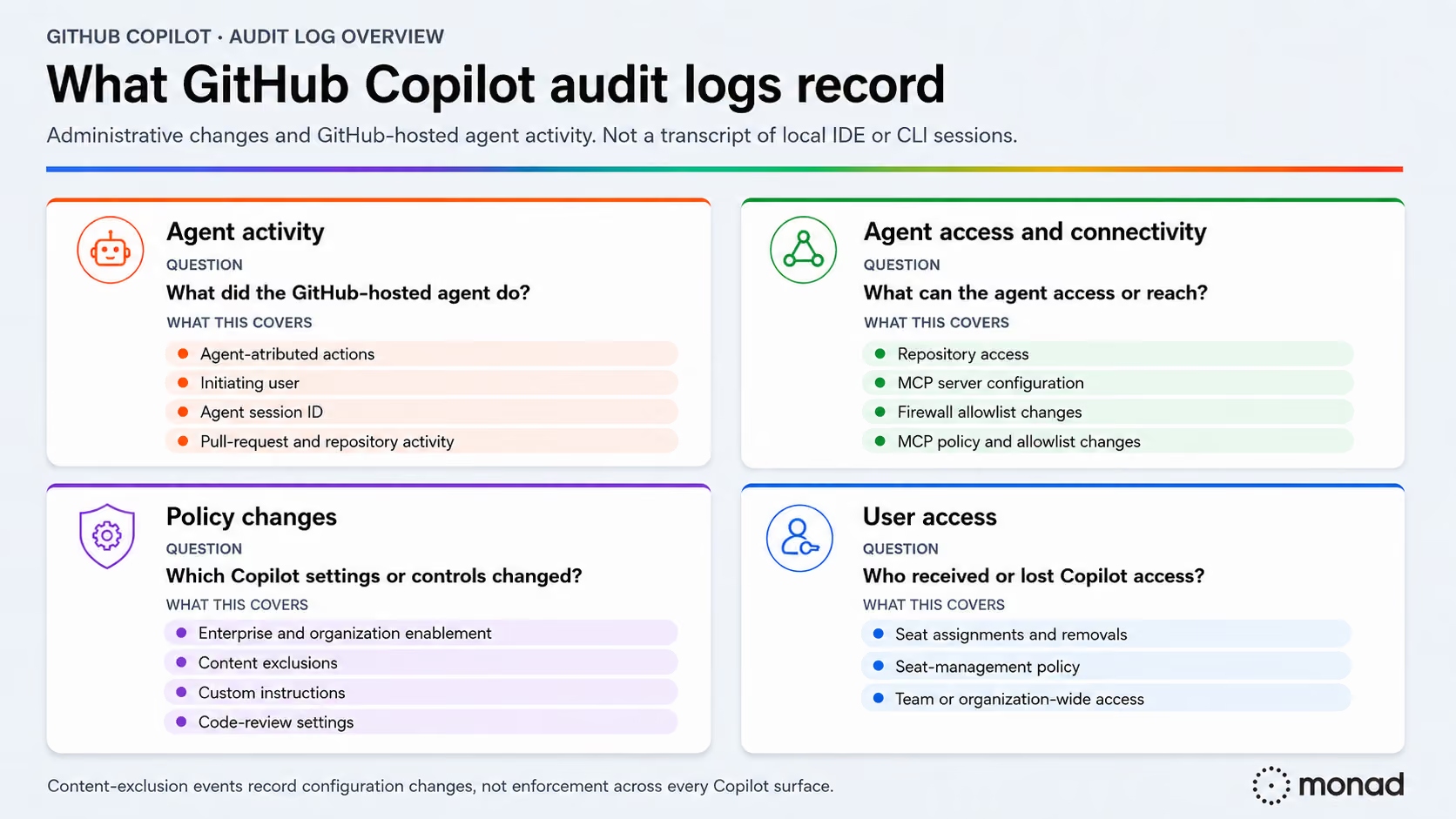
The records fall into two groups:
- Plan and configuration events record changes to Copilot access, licenses, settings, policies, and agent configuration. Use
action:copilotto find this family. - Agent activity events record actions that supported coding agents perform on GitHub. Use
actor:Copilot. In these records,actor_is_agentistrue,useridentifies the person who initiated the activity, andagent_session_idappears only when an agent session generated the event.
These are Copilot-related records in GitHub’s audit logs, not a separate Copilot log. Neither group captures a full local IDE or CLI session.
Covering the local session gap
Teams can close part of this gap for Copilot Chat in VS Code and Copilot CLI by exporting OpenTelemetry data to an OTLP-compatible collector. This adds traces and metrics for agent interactions, model calls, tool executions, token usage, and errors. Prompt, response, and tool-argument content is excluded by default and requires explicit opt-in.
Sample record
Example: an administrator enabled Copilot cloud agent for a private repository (copilot.swe_agent_repo_enabled).
{
  "@timestamp": 1784563385002,
  "_document_id": "7b3312ae-8a94-7e9c-d9ce-5c4a01c710fc",
  "action": "copilot.swe_agent_repo_enabled",
  "actor": "alice-admin",
  "actor_id": 627352,
  "actor_is_agent": false,
  "actor_is_bot": false,
  "business": "example-enterprise",
  "business_id": 78586,
  "created_at": 1784563385002,
  "operation_type": "modify",
  "org": "example-org",
  "org_id": 27431506,
  "owner": "example-org",
  "owner_type": "Organization",
  "public_repo": false,
  "repo": "example-org/payments-service",
  "repo_id": 88342177,
  "user_agent": "Mozilla/5.0 (Macintosh; Intel Mac OS X 10_15_7) AppleWebKit/537.36 (KHTML, like Gecko) Chrome/150.0.0.0 Safari/537.36"
}
Few details on how to think about the key fields:
actor_idis the stronger field for tracking a GitHub account over time because the actor login can change.actor_is_agentandactor_is_botare bothfalse, so this is an admin change, not an agent-session event.public_repoisfalse, so the target is private.user_agentmay help identify the client used to make the change.
Common documented events in GitHub’s organization audit-event reference and enterprise audit-event reference include:
- Seats and licensing:
copilot.cfb_seat_added,copilot.cfb_seat_assignment_created,copilot.cfb_seat_assignment_unassigned,copilot.cfb_seat_cancelled, andcopilot.cfb_seat_management_changed. - Organization and feature settings:
copilot.cfb_org_settings_changed,copilot.cfb_enterprise_settings_changed, andcopilot.plan_changed. - Content exclusions and review behavior:
copilot.content_exclusion_changed,copilot.custom_instructions_updated, andcopilot.code_review_repository_settings_updated. - Agent access and connectivity:
copilot.swe_agent_repo_enabled,copilot.swe_agent_repo_enablement_updated,copilot.swe_agent_mcp_config_updated, andcopilot.swe_agent_firewall_allowlist_updated. - MCP registry:
mcp_registry.settings_update,mcp_registry.allowlist_add_server,mcp_registry.allowlist_remove_server,mcp_registry.allowlist_assign, andmcp_registry.allowlist_remove_assignment.
This is not a complete list. Audit schemas change as GitHub ships features, and event availability varies by plan and configuration.
What the audit log will not show
GitHub’s standard Copilot audit records do not include local client-session data. Do not expect them to contain:
- Prompts or responses from IDE, CLI, or chat sessions.
- Suggested or generated code.
- The files used as local context.
- Local tool calls, commands, or approval decisions.
- Complete process or network activity from an agent session.
Content exclusions have narrower coverage than the event name suggests. GitHub says they do not apply to Copilot CLI, Copilot cloud agent, or Agent mode in Copilot Chat in IDEs. If an organization excludes /src/payments/**, supported inline suggestions and chat modes should ignore those files after the setting propagates.
The exclusion does not stop the unsupported surfaces from reading or changing them, and changes can take up to 30 minutes to reach IDEs. A copilot.content_exclusion_changed event proves the configuration changed; it does not prove every Copilot surface was blocked. Quirks... Don’t we love them?
Detection and hunting ideas
As with all log sources, some event types carry more security value than others. Agent activity and changes to what an agent can access or reach usually provide more security context than routine licensing events. Your threat model, sensitive repositories, and normal administrative workflows set the order in your environment.
Unexpected agent activity
Agent activity is often the strongest direct signal from this log source because it reflects action, not just a setting change. Activity in a sensitive or unapproved repository gives you a concrete place to investigate.
Useful signals:
actor_is_agentevents in repositories where agent use is uncommon.- Activity initiated by a user who does not normally use an agent in that repository.
- Pull requests, commits, or repository changes outside the team’s normal workflow.
Agent access and connectivity changes
Repository access, MCP configuration, and firewall allowlists shape what Copilot cloud agent can read, call, or reach. Changes that touch sensitive repositories or introduce new external systems carry more context.
Useful signals:
- Agent access added to a sensitive repository.
- New third-party MCP servers.
mcp_registryallowlist or policy changes.- Firewall allowlist updates that introduce new destinations.
The firewall-allowlist event confirms that a setting changed, but it may not show the old and new values. Pull the current configuration or the approved change record to resolve the difference.
Do not treat the agent firewall as universal egress control. GitHub says it covers processes started by the agent through its Bash tool inside the GitHub Actions appliance. It does not cover MCP servers, configured setup steps, or processes outside that appliance, and GitHub notes that sophisticated attacks may bypass it.
Policy and content-exclusion changes
Copilot enablement, code-review settings, custom instructions, and content exclusions change how Copilot operates and which repositories or features can use it.
Useful signals:
- Copilot or cloud-agent access expanded to more organizations or repositories.
- Content exclusions removed or narrowed.
- Policy changes made outside the normal administrative workflow.
copilot.content_exclusion_changed may show the current excluded_paths, but not the previous list. Compare it with an earlier event or configuration baseline to see what changed. The coverage and propagation limits above still apply.
Seat lifecycle changes
Seat events rarely carry enough value without enrichment or context. They become more useful when identity or employment data shows access for a terminated user, contractor, dormant account, or unexpected team.
Useful signals:
- Seats assigned or restored for terminated users or accounts believed to be inactive.
- Access granted to unexpected contractors, users, or teams.
- Seats restored after an expected removal.
The Copilot seat API’s last_activity_at field can add usage context, but it is not part of the audit event. Updates can lag by 24 hours, IDE activity appears only when telemetry is enabled, and the value becomes nil after 90 days without new activity.
Collecting the logs
GitHub exposes organization and enterprise audit logs through GET /orgs/{org}/audit-log and GET /enterprises/{enterprise}/audit-log. Use action:copilot for plan and configuration events, actor:Copilot for agent activity, and include mcp_registry.* if MCP registry changes are in scope. GitHub retains these events for 180 days. Your SIEM may also support native GitHub audit-log streaming or a connector for this source.
Monad’s GitHub Copilot Logs input incrementally retrieves GitHub Enterprise audit records and filters to action:copilot.*. The optional bot_actions_only setting limits results to events initiated by the Copilot bot, and backfill_start_time controls historical collection. Monad pipelines can normalize, filter, enrich, and route the resulting records to multiple destinations.
Closing
GitHub Copilot audit logs are worth collecting because they show the control-plane changes around a developer tool that can read code, change files, run commands, and reach external systems, along with agent activity on GitHub.
In our opinion, the strongest places to focus are unexpected agent activity, new repository access, MCP server or policy changes, firewall allowlist changes, and reductions in content exclusions. Seat changes add useful identity context when joined with directory or employment data.
Which of these becomes an alert, hunt, or investigation pivot depends on your threat model and normal workflows. The audit log gives you the control-plane timeline; endpoint, Git, pull-request, CI/CD, and network data fill in the execution story.
Start in Monad or book a walkthrough, and we’ll help you begin collecting GitHub Copilot audit logs.
Related content

Valerie Worman
|
September 23, 2026