.png)
October 22, 2026
Claude Cowork Logs: What’s Emitted, Detection Opportunities, and the Gaps Between Them
.avif)
Darwin Salazar
Head of Growth
Last verified October 21, 2026. Anthropic is merging Cowork and chat into one Claude experience. If your org hasn't switched, everything here applies as written. If it has, the OTel setup and event types stay the same, but content capture and coverage change. We flag those differences throughout. Anthropic also changed the content capture default: current Claude Desktop versions send metadata only unless you opt in. Log schemas change, so check Anthropic's Cowork monitoring docs for the latest before you write detections against them.
TL;DR
- Cowork’s OpenTelemetry links prompts, tool calls, and approvals to a session. Current Claude Desktop versions send metadata only unless an admin turns on content capture, and some session types never carry content.
- Confirm events reach your collector and check connected-system logs for changes. A successful
tool_resultmeans the call returned without an error. It doesn’t prove the file, record, or setting actually changed. - Use Monad to parse, redact, and route the stream to your SIEM or data lake, where you can correlate it with identity and endpoint telemetry.
Claude Cowork runs tasks your users assign, using the folders and tools they give it access to. After a Cowork task reads files or calls an MCP tool, can your team reconstruct who ran it, what it touched, who or what approved each action, and what actually changed?
Cowork's OpenTelemetry export gives you the data to answer the first three, but you only see what it touched if you turn on tool details capture, which is now off by default. The fourth lives in the logs of whatever system Cowork touched.
Think about AI audit evidence in three layers:
- Runtime: what the agent did
- Control plane: changes to access, roles, policies, and keys
- Feature invocation: who used a feature and when
Cowork logs are a runtime source. They’re the closest record of what the agent did, but you still need endpoint, identity, and connected-system logs to confirm effects.
This post covers what Cowork logs, how to collect it, the quirks that break detections, what to hunt for, and where you'll need other logs.
Before you collect anything
Cowork OTel monitoring is available on Team and Enterprise plans. An admin sets it up once for the organization under Organization settings -> Cowork (some Anthropic docs still call it Admin settings) with an OTLP endpoint, a protocol (HTTP/JSON or HTTP/protobuf), and auth headers. Content capture is a separate, per-device key, covered below. Settings load when a session starts, so existing sessions keep the old configuration.
Version requirements are for Claude Desktop, not the browser or mobile apps. Local session monitoring needs Desktop 1.1.4173 or later. Monitoring cloud sessions needs 1.22209.3 or later. Several behaviors described below, including model response events, start at 1.17377.
If your org is on the unified Claude experience: your OTel export keeps working. Each conversation starts as a chat and moves into a Cowork cloud session when a task needs to run code or work with files. That cloud session sends the same event types as any other cloud session, but always as metadata only. Your content capture policy doesn't apply to it. Enterprise admins turn this on as Chat and Cowork unified (beta), and Anthropic gives Enterprise orgs at least 30 days' notice before changing anything. Team plans follow soon. Orgs using zero data retention, the HIPAA-ready configuration, or customer-managed encryption keys can't switch yet.
If you're on Claude Enterprise, there's a second evidence source. The Compliance API covers Cowork on web, desktop, and mobile, plus Claude Code and chats, and it runs in parallel with OTel. For unified orgs, Anthropic recommends the Compliance API. Treat OTel as the real-time metadata stream. The Compliance API serves local and remote Cowork transcripts from separate endpoints. You need a Compliance Access Key with read:compliance_user_data; Admin API keys get a 403. To join the two sources, match user.account_id from the OTel events to the Compliance API's user ID. Both use the same tagged format.
What the export records
Every event carries session.id, and prompt.id ties together every API call and tool run from a single prompt. Cowork tags every event with service.name=cowork.
Here's a tool_result for an MCP call with toolDetails captured. Values are illustrative.
{
  "event.name": "tool_result",
  "session.id": "4f1c9e2a-...",
  "prompt.id": "b7d0e3c1-...",
  "user.email": "jdoe@example.com",
  "workspace.host_paths": ["/Users/jdoe/Finance/Q3-close"],
  "tool_name": "mcp_tool",
  "success": "true",
  "duration_ms": "812",
  "decision_type": "accept",
  "decision_source": "config",
  "tool_parameters": "{\"mcp_server_name\":\"gdrive\",\"mcp_tool_name\":\"search_files\"}",
  "tool_input": "{\"query\":\"vendor contracts 2026\"}"
}
Three details in that record matter for anyone building detections. tool_parameters and tool_input arrive as JSON-encoded strings, so parse them before you query mcp_server_name or a file path. For MCP servers users configure themselves, tool_name is just mcp_tool. The server and tool names only show up in tool_parameters, and only with toolDetails captured. And tool_input is truncated: strings over 512 characters get cut, and the whole field caps around 4K. A truncated value can fail to parse. That doesn't mean the tool ran without arguments.
Check the content capture default
otlpContentCapture controls whether Cowork events include prompt text, model responses, and tool details. It's a per-device key you push through MDM. On current Claude Desktop versions, leaving it unset gets you metadata only. Older versions on first-party deployments still send content when it's unset, and some session types stay metadata only whatever the key says.
What each setting exports
What the setting does not hide:
- Events carry
workspace.host_pathseven when the key is[]. It lists the folders the user connected to the task. - First-party deployments include
user.email. Third-party deployments useenduser.idinstead; treat it as a configured identifier, not verified identity. api_errorevents always carry theerrormessage, and it can repeat part of the request that caused it.
To get metadata only:
Set otlpContentCapture to [] — not an empty string. That also covers older Desktop versions that send content when the key is unset. After you push the key through MDM, restart Claude Desktop and start a new session. Check cloud sessions separately; local behavior does not confirm what cloud sessions export.
To get content:
List the categories you want, such as userPrompts or toolDetails. Leaving the key unset won't get you content on current versions. Content only comes through for Cowork sessions started from Claude Desktop, so test a local and a cloud session before you build detections on it. Captured prompts and tool inputs can include secrets and customer data, so lock down retention and access at the destination first.
Three things to hunt for
Sensitive file and workspace access
In a local session, workspace.host_paths shows which host directories the user selected. With toolDetails captured, tool_input and parsed tool_parameters add file paths, URLs, search patterns, and arguments. Cloud sessions may not have that local host context, and the unified Claude experience moves more work into cloud sessions. Expect workspace.host_paths to show up less often as users switch over. And a selected directory isn't proof Cowork read every file in it. It's the scope the user granted, not a file access log.
Hunt: sessions where a path in workspace.host_paths is a credential, HR, or finance folder, like ~/.ssh, ~/.aws, or a Finance share, or a parent that contains one, like the user's whole home directory. With toolDetails captured, also flag file paths in tool_input that hit credential files like .env or id_rsa.
Fields: workspace.host_paths, session.id, tool_name, tool_input, tool_parameters, success
MCP and tool activity
mcp_server_scope plus the parsed server and tool names give you an inventory of the MCP servers Cowork actually calls. That's where you look for unfamiliar services, bulk retrieval, or access to systems that hold regulated data. Skills and plugins show up too, but ones that don't come from Anthropic appear under a placeholder name unless you capture toolDetails. The tool result reports Cowork's view of the outcome. The connected system's own logs confirm what changed.
Hunt: an mcp_server_name you haven't seen before in your org, or one prompt.id with far more read or search calls against a single server than that user's baseline. This depends on toolDetails capture. Without it, expect MCP calls with no server or tool name. That's the default on current Desktop versions, and the only option for scheduled cloud tasks, unified chats, and sessions started on web or mobile.
Fields: mcp_server_scope, tool_parameters.mcp_server_name, tool_parameters.mcp_tool_name, prompt.id, session.id, success
Approval decisions
tool_decision records accept or reject and where the decision came from: config, hook, or a user choice (user_permanent, user_temporary, user_abort, user_reject). If your policy says a human reviews state-changing actions, a config approval on one means nobody did. That's not misuse on its own, but it tells you which actions to check next.
Hunt: tool_decision events where source is config on tools that write, delete, or send, plus the first user_permanent approval per user and tool, which marks when someone chose to always allow it. If your org pre-approves tools, baseline config approvals before you alert on them. For MCP servers users add themselves, tool_decision only shows mcp_tool as the tool name. Run the same hunt on tool_result, which carries decision_source and, with toolDetails captured, the server and tool names in tool_parameters.
Fields: event.name, tool_name, decision, source, decision_source, tool_parameters.mcp_tool_name, session.id
Where the trail stops
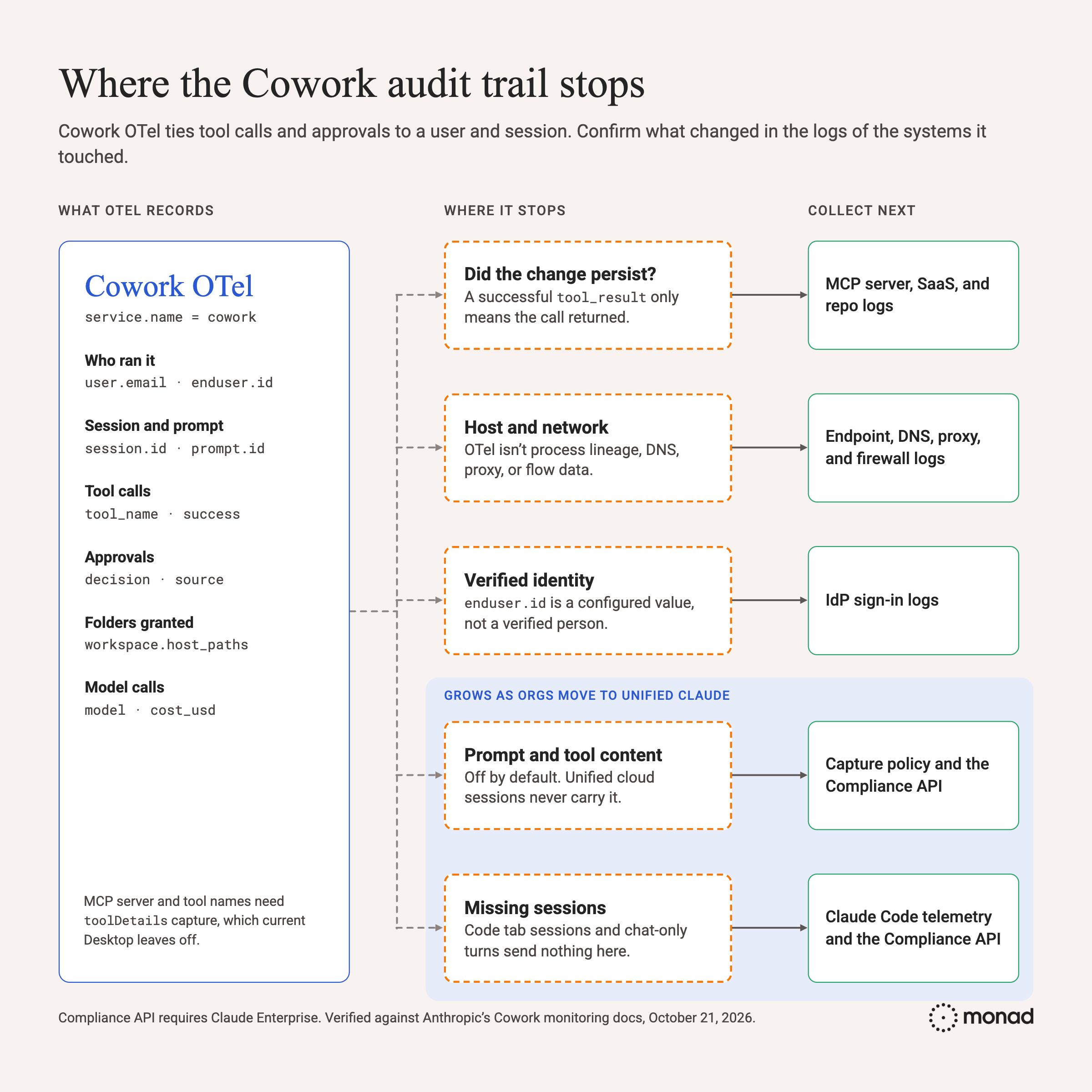
On identity: user.email isn't universal. Third-party deployments carry enduser.id instead, and what it contains depends on its configured source. Treat it as an attribute to correlate against your IdP, not as a verified personal identity.
A finished task doesn't mean the logs arrived
Cowork can finish a task even if your collector never receives its events. On third-party Desktop, if the collector can't be reached or refuses the request, the app keeps working, shows no error, and drops those batches.
Three checks to make:
- Delivery: Alert when Cowork event volume drops to zero for the org, or for an OS (
os.type) that normally sends events. A per-OS drop catches problems like the Windows transport fallback below. Per-user silence is noisy, since people stop using Cowork for normal reasons. - Coverage: Test local and cloud sessions separately. Events arriving from one don't confirm the other. On Enterprise, compare users in the Compliance API's Cowork session list with users sending OTel. Anyone in the first list but not the second is a telemetry gap.
- Egress: Cowork adds the collector host to the session's egress allowlist. Your firewall or proxy still has to allow the connection.
Transport note: Third-party Desktop sends three streams to the same endpoint, with service.name set to cowork, claude-code-desktop, or claude-desktop. Filter on it so Code and desktop-app events stay out of your Cowork detections. If you configure gRPC, Cowork still falls back to HTTP/protobuf on Windows or when its engine uses an HTTP proxy, and the desktop app always sends HTTP/JSON. The endpoint doesn't change when that happens, so those events never arrive at a gRPC port like 4317. Use HTTP/protobuf on 4318, and make sure the receiver accepts both HTTP formats.
Content-capture drift
If prompt, response, or tool input text starts showing up where you expected metadata, or disappears where you expected content, either the effective capture setting changed, Claude Desktop updated, or the work moved to a different session type. Expect the last two. Older first-party Desktop versions that send content when the key is unset switch to metadata only when they update. And as users move to the unified Claude experience, more of their work runs in unified cloud sessions, which never carry content. A populated field isn't proof either way. It can hold <REDACTED> or another placeholder. To confirm, run a harmless canary string for each content category through a test session and check that it arrives at the destination.
Fields: event.name, prompt, response, tool_input, tool_parameters, session.id
Collecting Cowork telemetry with Monad
Monad's Claude Cowork input is a push input. To set it up:
- Create the input and attach it to a pipeline.
- In Organization settings -> Cowork, set the OTLP endpoint to
https://PIPELINE_ID.data.monad.com:4318and the protocol to HTTP/protobuf. Add the headerAuthorization=ApiKey YOUR_API_KEY, using a Monad API key withpipeline:data:write. - Start a new Cowork session. Events start flowing.
From there, four Cowork-specific details matter in the pipeline:
session.idandprompt.idare how you rebuild a session. Keep them intact.workspace.host_pathsis an array. Flattening it breaks per-folder queries.tool_parametersandtool_inputare JSON strings, andtool_inputcan be truncated. Parse them, but keep the raw string so a failed parse doesn't lose evidence.service.nameiscoworktoday, but Anthropic is folding Cowork into one Claude experience. Set the filter as a config value instead of hardcoding it.
The pipeline is also where you mask or drop user.email, folder paths, and any captured prompt or tool text for destinations that shouldn't store them, and where you split by value: api_request events, which are mostly tokens and cost, go to cheaper storage, while tool_decision and tool_result go to the SIEM, where detections run.
To confirm what a Cowork action changed, you need logs from the system it touched. Monad's 350+ connectors cover the identity, endpoint, and SaaS logs that confirm it, plus the SIEMs and data lakes you send them to.
The takeaway
Cowork logs tie tool calls and approval decisions to a user and a session. File paths and MCP server names need toolDetails capture, which is off by default on current Desktop versions. Deployment type, Desktop version, session type, and capture settings decide which identities and content you get, so verify them before you rely on them. If your org is on the unified Claude experience, pair OTel with the Compliance API. Logs from the connected system show whether a reported action actually changed it.
We adapted this post from the Cowork chapter of Monad’s A Security Field Guide to AI Audit Trails (second edition, coming soon). To see Cowork telemetry flowing into your SIEM or data lake alongside identity and endpoint logs, schedule a demo.
Related content
Darwin Salazar
|
October 22, 2026