.png)
July 9, 2026
Cursor Audit Logs: What’s Emitted and Detection Opportunities
.avif)
Darwin Salazar
Head of Growth
TL;DR: Cursor audit logs show you when someone changes the controls around the agent. They do not show you what the agent did.
Cursor Agent sits close to the things security teams care most about: source code, credentials, terminals, repositories, and external systems through MCP servers. That access is governed by a set of controls. Access and roles. API keys. Privacy Mode. MCP configuration. Repo controls, team rules, hooks, and commands.
The audit log is the record of changes to those controls. An admin disables Privacy Mode. Someone mints a new API key. A team rule gets edited. That is what you can detect here.
What you will not see: Cursor docs state that audit logs do not include agent responses or generated code. Prompt text, terminal commands, MCP tool-call arguments, local file reads, file paths, .cursorignore hits, process lineage, and network connections are not available from the audit-log API or are not documented as audit-log fields. Treat those as runtime signals that require endpoint, network, Git, CI/CD, and Cursor Hooks.
Scope: This post focuses on Cursor audit logs exposed through the Cursor Admin API. Audit logs are only available on the Enterprise Plan.
This is the fourth post in our AI developer tool detection series, after OpenAI audit logs, Claude Code, and OpenAI Codex.
What the audit log can show
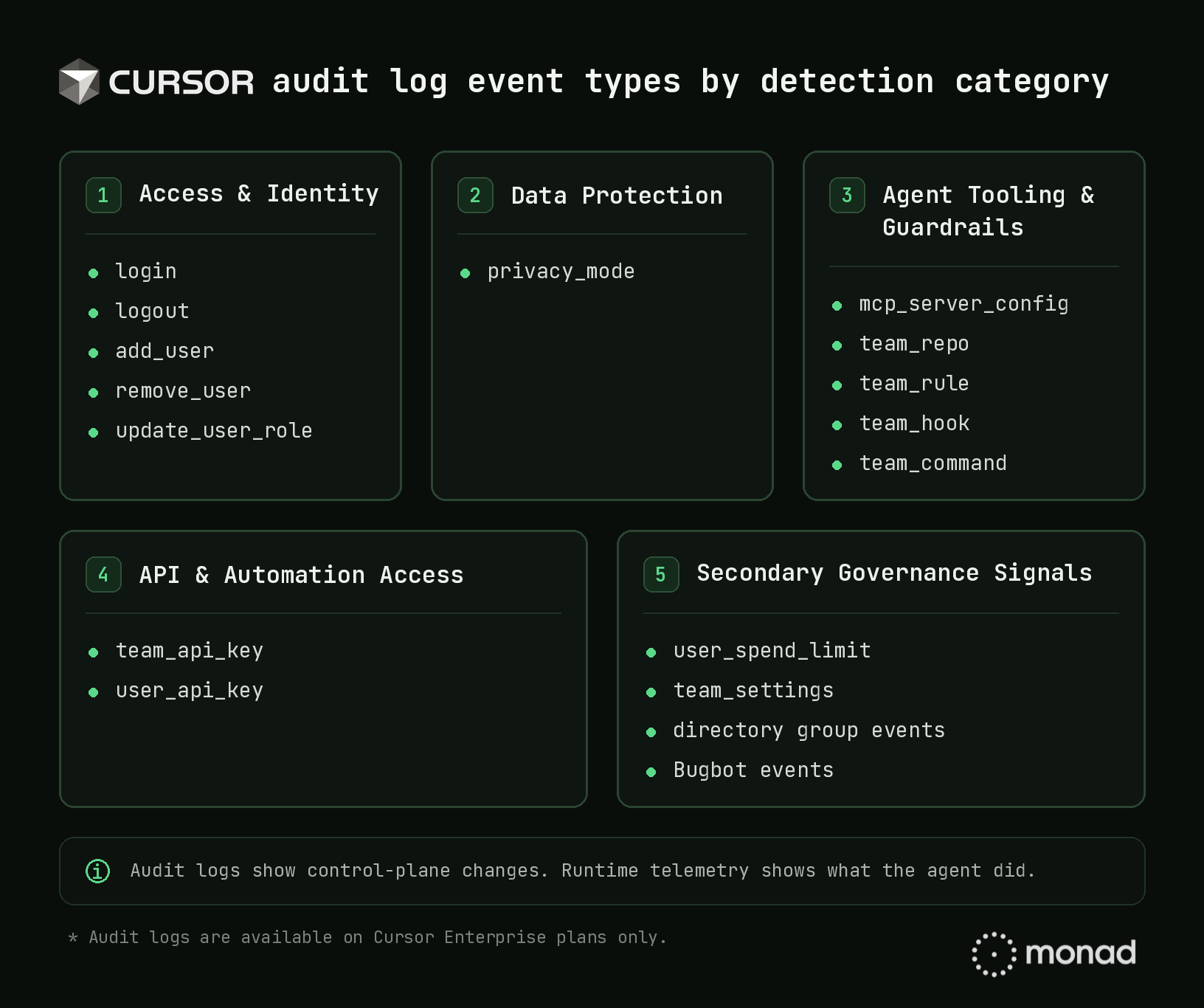
Cursor audit logs show logins, membership changes, role changes, API key creation, Privacy Mode changes, MCP configuration updates, repo controls, team rules, hooks, custom team command management, team settings, directory group activity, spend limit changes, Bugbot activity, and Cloud Agent environment lifecycle events.
A single example event:
{
  "event_id": "evt_abc123",
  "timestamp": "2024-01-15T12:30:00.000Z",
  "ip_address": "203.0.113.42",
  "user_email": "admin@company.com",
  "event_type": "add_user",
  "event_data": { "email": "newuser@company.com", "method": "manual" }
}
Use Cursor audit logs to detect control changes. Use runtime telemetry to investigate agent behavior.
High-value detection patterns
Start with events that change access, data handling, agent capability, or observability.
1. Privacy Mode changed
Privacy Mode is one of the first Cursor settings security teams should monitor.
A privacy_mode event could be used to detect when data protection settings are disabled, narrowed, or changed outside an approved process. That matters because disabling Privacy Mode weakens retention and training protections for prompts, code, and editor activity, with model/provider-specific exceptions.
If Privacy Mode changes are common, governance is the issue.
2. MCP server config changed
MCP is one of the most important Cursor surfaces to monitor because it connects agents to external systems.
A mcp_server_config event could be used to detect when a new server is added, when a local stdio execution path appears, when an unpinned package is introduced, or when a tool connection changes outside the normal admin flow.
Do not alert on every MCP edit forever. Maintain an allowlist and investigate new or changed execution paths.
3. User promoted to admin or owner
Role changes are simple and high-value.
An update_user_role event could be used to detect when a compromised user, dormant account, contractor, or unexpected employee gets promoted into a role that can change team settings, manage users, create API keys, or weaken controls.
The raw event is useful. The enriched event is better. Add IdP status, HR data, GeoIP, device context, and recent login history, and a routine role change can become a clear investigation lead.
4. API key created
API keys create durable access paths.
A team_api_key event could be used to detect new organization-level API access that needs an owner, justification, storage location, and rotation policy. Cursor’s Admin API docs note that API keys are tied to the organization, visible to admins, and unaffected by the original creator’s account status, which makes lifecycle management important.
A user_api_key event may be noisier in engineering-heavy environments. Baseline normal creation patterns and investigate spikes, privileged users, dormant accounts, or keys created after suspicious login activity.
5. Guardrails changed
Cursor team controls shape what the agent can access and what security can observe.
Changes to team_repo, team_rule, team_hook, or team_command could be used to detect weakened repository controls, relaxed agent rules, disabled hooks, or modified custom team command policies.
One caveat: team_command should not be treated as terminal command telemetry. The safer assumption is that this is a control-plane event for custom Cursor team command management, not a complete record of shell commands executed by the agent.
Hook changes deserve special attention. If Cursor Hooks are part of your runtime visibility model, a hook change may mean observability changed.
Getting Cursor audit logs into your pipeline
Cursor exposes audit events through GET /teams/audit-logs. The API supports page / pageSize pagination, a 20-requests-per-minute per team rate limit, and a 30-day max date range per request. For setup details, use the Monad Cursor Audit Logs input documentation. Monad sits upstream of the SIEM, so Cursor audit logs can be collected, normalized, enriched, routed to high-signal destinations, and retained in cheaper storage for investigation history.
Cursor audit logs are worth collecting because they show control-plane changes around an AI developer tool that can read code, edit files, run commands, and connect to external systems.
In my opinion, the highest-signal event types to start with for detection are Privacy Mode changes, MCP server config changes, admin or owner promotions, API key creation, and weakened repo, rule, hook, or custom team command controls.
Then correlate those events with endpoint, network, Git, CI/CD, and hook telemetry to have a fuller picture of what the agent did.
Start in Monad or book a walkthrough, and we’ll help you begin ingesting key Cursor activity.
Thanks to the Cursor team for technical review and feedback!
Related content
Valerie Worman
|
September 23, 2026
.avif)
.avif)