.png)
July 16, 2026
Google Workspace Gemini Activity Logs: What’s Emitted and Detection Opportunities
.avif)
.avif)
Darwin Salazar
Head of Growth
TL;DR:
Google Workspace Gemini activity logs show who used Gemini, when, from which IP, in which app, and through which action or feature surface (i.e., Gmail, Sheets, Drive). Coverage includes the Gemini app and Gemini within Google Workspace apps. The logs do not expose prompts, responses, file or message identifiers, token counts, model identifiers, or the exact content Gemini used. The feed is most useful when correlated with Login, Drive, Gmail, Calendar, DLP, and endpoint telemetry.
About this series: This is Part 5 of our AI Tooling Visibility series, where we dissect emerging AI log source, discuss their quirks, and provide guidance on how security teams can operationalize them. The guidance applies regardless of how the logs are collected or where they’re analyzed. Previous posts cover Claude Code, OpenAI Enterprise audit logs, OpenAI Codex OTel logs, and Cursor audit logs. Monad handles the pipeline layer by ingesting, transforming, enriching, and routing logs. Customers then query and correlate those logs, run hunts, and build detections in their SIEM, data lake, or analytics platform.
Introduction
Gemini now operates inside the systems that hold some enterprise’s most sensitive information: Gmail, Docs, Drive, Sheets, Slides, Meet, Chat, and more. In January 2025, Google began including Gemini AI features in Workspace Business and Enterprise plans instead of requiring separate add-ons. This inclusion changed the security risks and boundaries almost overnight.
Gemini does not bypass Google Workspace permissions, but it can make the information a user already has access to much easier to find, summarize, and act on. That increases the potential impact of excessive access, stale sharing, compromised accounts, and insider misuse, while untrusted emails, documents, and calendar invitations introduce indirect prompt-injection risk. The challenge for defenders is that the activity log records the Gemini interaction without showing the prompt, response, or exact Workspace content involved.
Researchers have shown the security implications of this. In 2025, 0DIN demonstrated that hidden HTML in an email could make Gmail’s “Summarize this email” output a fake security warning without a link, attachment, or script. Miggo later disclosed a now-mitigated Calendar flaw in which instructions planted in an invitation could, after a routine availability query, cause Gemini to place private meeting details into a new event visible to the attacker. Google has since described its layered defenses against indirect prompt injection. These examples show what becomes possible when attacker-controlled content enters Gemini’s context through a Workspace surface, and they provide a useful foundation for threat modeling.
The activity log establishes that a user invoked a Gemini feature, not what Gemini accessed or what happened next. It can show that a user summarized content in Gmail or confirmed a tool operation, but not which email, file, or calendar event was involved, what context the model received, or whether the action succeeded. In that regard, this log source is fairly limited which is why we recommend enriching this source before it reaches the SIEM. Below, we’ll break down what the feed emits, how to filter it, and which supporting logs make it useful for detection, hunting, and investigations.
What Google emits
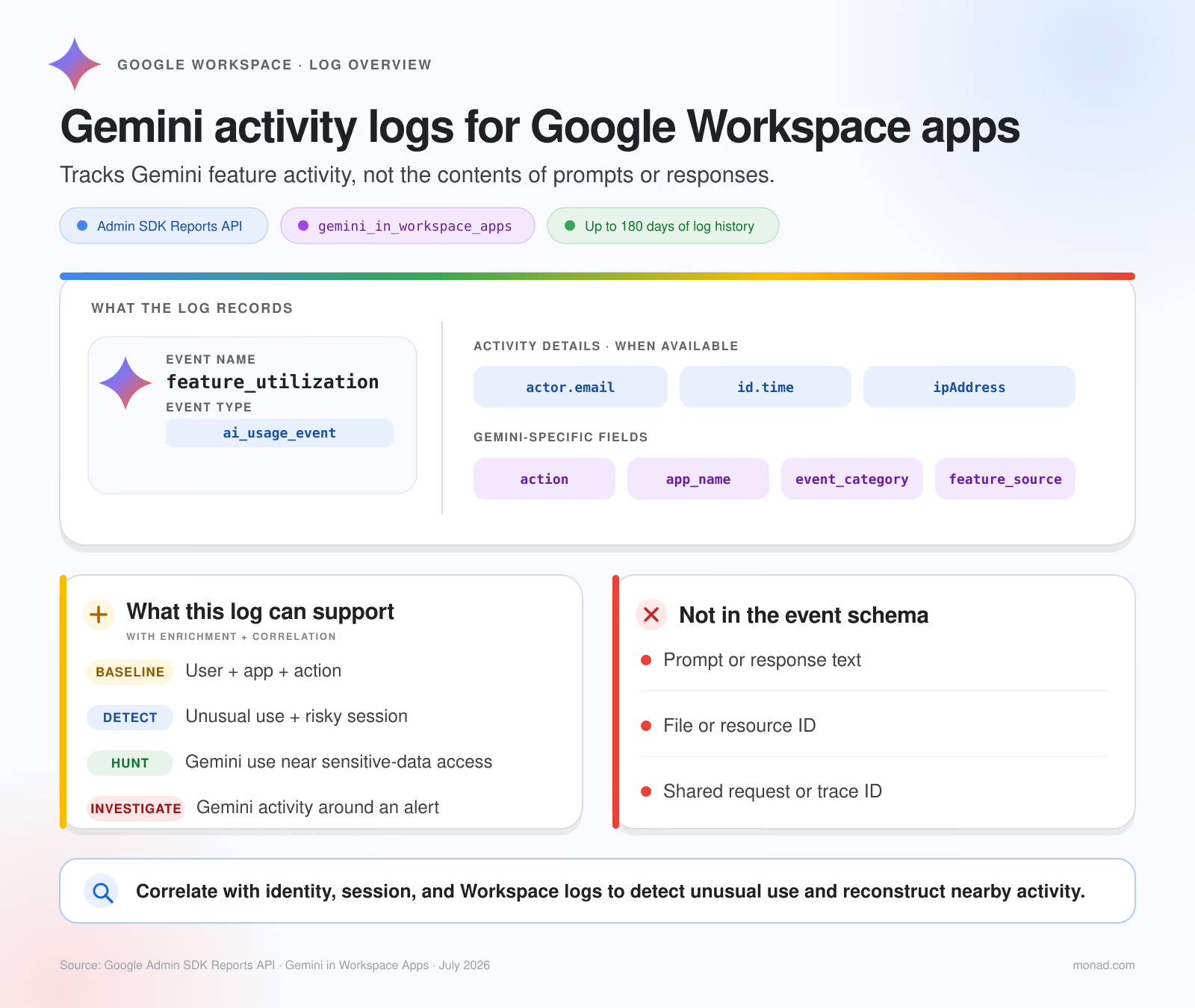
Google exposes the gemini_in_workspace_apps application through the Admin SDK Reports API. Documented usage records have events[].type=ai_usage_event and events[].name=feature_utilization. The log originally became available on June 20, 2025, and provides a rolling history of up to 180 days depending on your GWS plan. Export using Monad, the GWS Reports API or, on supported editions, Workspace’s BigQuery export if you need a longer window.
Think of each record in two layers. The activity envelope provides time, account, and source IP. The Gemini event adds four parameters. In the raw API, those parameters arrive as key:value pairs under events[].parameters.
Sample log record
{
  "kind": "admin#reports#activity",
  "id": {
    "time": "2026-07-14T20:06:54.682664Z",
    "uniqueQualifier": "a09e6911-dfb6-44bc-488d-83f89faf3169",
    "applicationName": "gemini_in_workspace_apps",
    "customerId": "C0q2w3e4r"
  },
  "etag": "\"etag_example\"",
  "actor": {
    "callerType": "USER",
    "email": "carol.brown@example.com",
    "profileId": "27a481b1-edac-a0a8-c560-fbd3c5456510"
  },
  "ipAddress": "116.74.67.114",
  "events": [
    {
      "type": "ai_usage_event",
      "name": "feature_utilization",
      "parameters": [
        {
          "name": "app_name",
          "value": "drive"
        },
        {
          "name": "feature_source",
          "value": "side_panel"
        },
        {
          "name": "action",
          "value": "generate_apps_search_overlay_suggestions"
        },
        {
          "name": "event_category",
          "value": "inactive"
        }
      ]
    }
  ]
}
Google recorded a feature_utilization event for Carol Brown invoking Gemini’s search-overlay suggestions from the Drive side panel. The log shows who used which feature, where, and from what IP—but not the contents involved or what happened next.
Making sense of event_category
event_category is the best first cut for filtering the feed. Google documents four active categories: active_conversations, active_generate, active_summarize, and active_unspecified. These represent conversations, generation, summarization, and other active use which Google has left unspecified. Start detection and hunting here because these events most clearly reflect direct Gemini use.
inactive means Google did not count the event as active Gemini use. In the sample above, Gemini generated Drive search suggestions in the side panel without the user submitting a prompt. Other background activity can include generating starter prompts, proactive suggestions, or summaries when the side panel opens. Google documents these actions but does not publish how each maps to event_category, so inactive may still involve some user interaction. This makes it more useful for baselining and investigation context than as a standalone detection signal.
If storage costs are a concern, we recommend sending inactive events to a data lake or wherever you archive logs. They can be rather noisy and provide minimal security value.
Where Gemini activity logs help most
This log source is a starting point, not a complete detection source. Start with the user, IP, timestamp, app, and action. app_name determines which supporting logs to investigate.
With Monad, teams can ingest and normalize Gemini activity alongside more than 30 Google ecosystem sources—including Login, Drive, Gmail, and Calendar—and enrich actor.email and IP fields with identity and network context before routing the data to the SIEM. Teams can then correlate those records with DLP, endpoint, and other Google telemetry downstream. Because the records lack a shared request or resource ID, most correlation depends on matching activity from the same user within a tight time window.
Enrich and Correlate with Drive logs for file context
Google says Drive can emit one access_item_content event for each file Gemini accesses for a user query. These records add the missing file ID, title, type, owner, and visibility. The originating_app_id field identifies the Google Cloud project that performed the action.
In your SIEM, data lake, or other analytics platform, you can hunt for active Gemini use, Gemini-attributed Drive access, and then a download, export, external share, or DLP event involving a sensitive file. Without a shared transaction ID, correlate on the same user within a tight time window and treat the results as candidate matches.
Vault adds content — but only for the Gemini app
Google Vault exposes much more content for Gemini app conversations. It can retain conversations, place them on hold, search by account or organizational unit and date, and export the full prompt and response. Results include the conversation title, owner, timestamp, and up to 12 hours of surrounding context.
That coverage does not extend to Gemini inside Gmail, Drive, Docs, or other Workspace apps. Google’s supported-data documentation excludes Gemini for Google Workspace data, media files or Gems attached to prompts, and media generated in responses. Vault can show what a user said to the Gemini app, but not what Workspace content Gemini accessed.
The Google Vault API supports Gemini queries and XML exports for scoped investigations. This is separate from Monad’s Vault Activity input, which collects the administrative audit trail—actor, IP, matter, query, resource, and target user—not conversation content. Use the audit feed to monitor Vault searches and exports and correlate them with identity and admin activity.
Vault supports eDiscovery and post-event investigation, not live monitoring or prevention. Use DLP, browser, endpoint, or another inline control to inspect or block content before it reaches Gemini.
Getting the data into your destinations
Google exposes Gemini activity through Activities.list:
GET /admin/reports/v1/activity/users/all/applications/gemini_in_workspace_apps
You can collect the data directly from this endpoint, use your SIEM’s Google Workspace integration if it supports the feed, or ingest it through Monad.
Monad gives teams the pipelines, transforms, enrichments, and routing needed to prepare the feed before it reaches the SIEM. Teams can normalize the parameter array, preserve unknown values, enrich users and IPs, filter by event_category, and send each record to the right destination. Keep active and unknown events searchable, and if volume warrants it, send inactive activity to lower-cost storage.
Treat Gemini events as evidence of use, not abuse. Use them to find related activity in identity, network, and Workspace logs that can establish risk or impact.
Bring Gemini activity into Monad, enrich, and filter it before it reaches your SIEM. Start in Monad with a trial or book a walkthrough.
Related content
Valerie Worman
|
September 23, 2026
.avif)